
Let’s be honest: browsing the web has turned into a relentless game of tab whack-a-mole. You search for something, open a link, then another, then you’re six tabs deep trying to remember what you were originally looking for. It’s exhausting.
Google’s been quietly working on a fix for this, and their latest update to AI Mode in Chrome might actually be the first thing in years that makes me reconsider how I use a browser.
The side-by-side trick that actually works
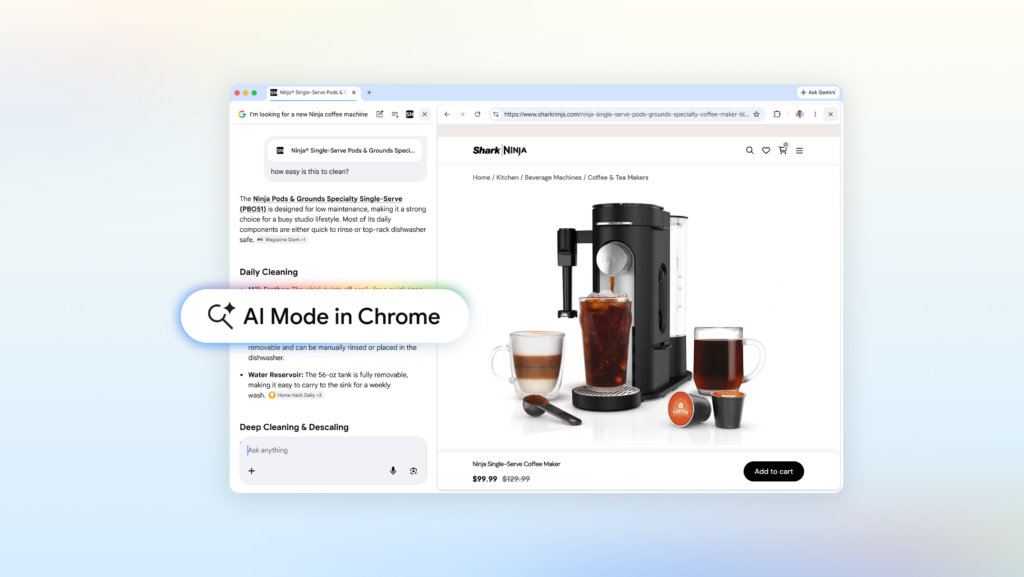
The headline feature here is simple but smart: when you click a link in AI Mode on Chrome desktop, the webpage opens right next to your search results instead of replacing them. No more alt-tabbing back and forth. You’ve got the page on one side, your AI-powered search on the other, and you can keep asking questions without losing your place.
I tried this with something mundane – looking for a coffee maker that doesn’t dominate my counter. AI Mode spat out a few models, I clicked one, and there it was: the retailer’s page on the right, my search on the left. I asked “How easy is this to clean?” and it pulled context from both the page and the broader web to give me a real answer. No tab switching, no re-typing my query. It felt… natural. Which is weird to say about a browser feature.
Your open tabs are now fair game
The other update that caught my attention is the ability to search across your existing tabs. On Chrome desktop or mobile, there’s a new “plus” menu in the search box on the New Tab page (or inside AI Mode itself). You can select recent tabs, images, or even PDFs and feed that context into your search.
This is one of those features that sounds minor until you actually need it. Say you’re researching hiking trails and have five tabs open with different routes and reviews. Instead of manually comparing them, you can just dump those tabs into AI Mode and ask for kid-friendly alternatives in a different location. It reads the pages, synthesizes the info, and gives you something useful.
Or – and this is where it gets interesting for students – you can throw in your class notes, lecture slides, and academic papers, then ask for more examples on a tricky concept. AI Mode uses those tabs to tailor its response and suggests more sites to explore. I’ve been burned by “AI study tools” before, but this actually respects the context you’ve already built.
What’s still missing
For all the polish, there are rough edges. The side-by-side view is desktop-only for now, which is a bummer because mobile is where tab hopping really hurts. And while AI Mode is fast, it’s still Google – you’re trading some privacy for convenience, and the usual data collection caveats apply.
Also, the feature requires you to be in AI Mode, not regular search. That’s fine for power users, but most people will just keep typing into the omnibox and never see this. Google needs to surface it better or make it the default behavior.
Bottom line
This is the first time in a while that I’ve felt like a browser update actually solved a real problem instead of just rearranging the furniture. AI Mode in Chrome doesn’t reinvent search – it just makes it less annoying to follow a thread without losing the plot. If you spend any time researching online, it’s worth turning on.
Now if they could just do something about the 47 tabs I have open right now…
Comments (0)
Login Log in to comment.
Be the first to comment!